
Authentication Code in App and Push Notification
🎯 Purpose
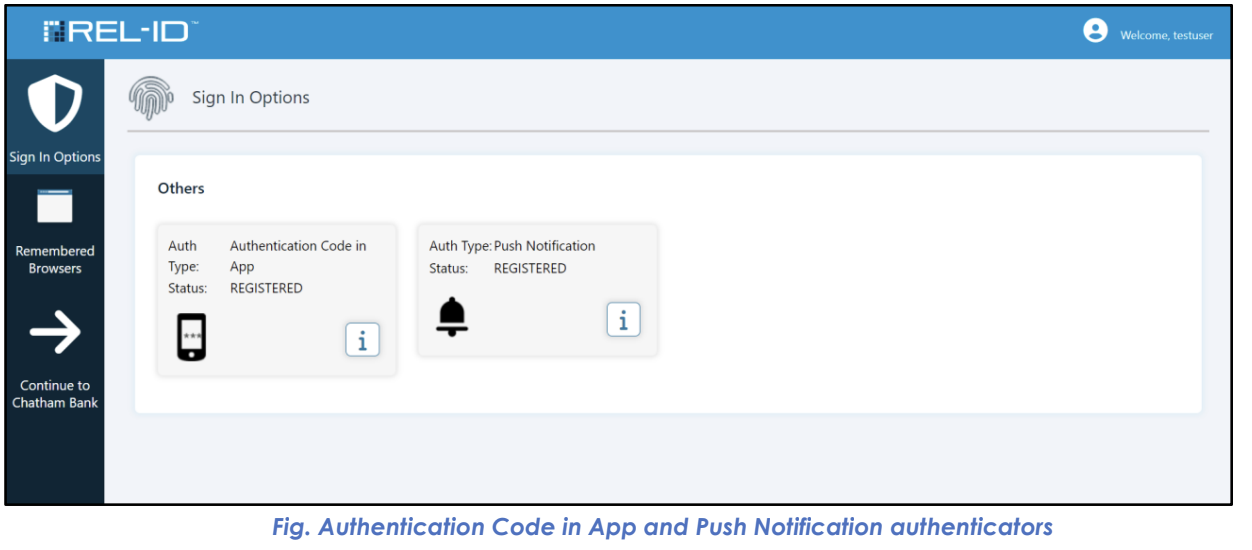
Provides users who have activated the Ditto ID mobile application with access to the most secure and convenient authentication methods: Authentication Code in App (Time-based OTP) and Push Notification authentication.
🏢 Enterprise-Grade Authentication Factors
These authentication methods represent the highest level of security available in the Ditto ID system and are automatically available to users who have successfully enrolled and activated the Ditto ID mobile application.
📱 Authentication Code in App (Time-based OTP)
🎯 Functionality Overview
- Purpose: Provides offline authentication capability through time-based one-time passwords
- Technology: OATH TOTP (Time-based One-Time Password) standard
- Availability: Automatic for Ditto ID mobile app users
- User Experience: 6-digit codes generated every 30 seconds
📊 Technical Characteristics
| Aspect | Specification | User Benefit |
|---|---|---|
| Code Length | 6 digits | Easy to read and enter |
| Refresh Interval | 30 seconds | Fresh codes regularly |
| Offline Capability | ✅ Yes | Works without internet |
| Device Dependency | Mobile app required | Highest security level |
| Synchronization | Time-based | No server communication needed |
🔄 User Experience Flow
- Code Generation: Ditto ID mobile app automatically generates current code
- Code Display: 6-digit code prominently shown in mobile app
- Code Entry: User enters code on web authentication portal
- Validation: System validates code against current time window
- Authentication: Valid code allows user to proceed
⚡ Key Advantages
- Offline Operation: Works without mobile data or WiFi connection
- High Security: Time-based algorithm prevents code reuse
- User Control: No dependency on external communication services
- Reliability: Not affected by network issues or service outages
🔔 Push Notification Authentication
🎯 Functionality Overview
- Purpose: Provides real-time, tap-to-approve authentication
- Technology: Push notification with cryptographic response
- Availability: Automatic for Ditto ID mobile app users
- User Experience: Single tap to approve or deny authentication
📊 Technical Characteristics
| Aspect | Specification | User Benefit |
|---|---|---|
| Response Time | Real-time | Immediate authentication |
| User Action | Tap approve/deny | Extremely convenient |
| Security Level | Very High | Cryptographic validation |
| Connectivity | Internet required | Uses secure push channels |
| Context Awareness | Rich information | See login details |
🔄 User Experience Flow
- Authentication Request: User initiates login on web portal
- Push Delivery: Notification sent to registered mobile device
- Notification Display: Rich notification with login context
- User Review: User can see login attempt details (time, location, device)
- User Decision: User taps "Approve" or "Deny" in notification
- Response Transmission: Decision securely transmitted to web portal
- Authentication Result: Approval grants access, denial blocks login
⚡ Key Advantages
- Convenience: Single tap authentication
- Security Context: User sees login attempt details
- Real-time: Immediate response and authentication
- User Control: Explicit approval required for each login
🎨 User Portal Display
📱 Visual Representation
In the User Portal Sign In Options screen, these factors are displayed with:
- Factor Icons: Distinctive visual identifiers
- Factor Names: "Authentication Code in App" and "Push Notification"
- Status Indicators: Show that factors are active and available
- View-Only Status: No user configuration options (automatically managed)
🔒 Management Characteristics
| Aspect | Authentication Code in App | Push Notification |
|---|---|---|
| User Configuration | ❌ Not Required | ❌ Not Required |
| Automatic Setup | ✅ Yes | ✅ Yes |
| Portal Management | View Only | View Only |
| Availability Control | Mobile app status | Mobile app status |
🛡️ Security Features
🔐 Enterprise Security Standards
- Cryptographic Protection: Both methods use strong cryptographic algorithms
- Device Binding: Tied to specific registered mobile devices
- Automatic Management: No user configuration reduces security risks
- Audit Trail: All usage logged for security monitoring
🚨 Security Considerations
| Security Aspect | Implementation | User Impact |
|---|---|---|
| Device Control | Must control registered mobile device | High security assurance |
| Time Synchronization | Critical for TOTP accuracy | Ensure device clock accuracy |
| Network Security | Push notifications use secure channels | Reliable delivery |
| Access Control | Device-level protection important | Secure mobile device |
🎯 User Guidance and Best Practices
📱 Mobile App Maintenance
- App Updates: Keep Ditto ID mobile app updated
- Device Security: Use device lock screens and biometric protection
- Time Accuracy: Ensure device clock is synchronized
- Backup Options: Understand alternative authentication methods
🔄 Usage Recommendations
- Primary Methods: Use these as primary authentication when available
- Backup Awareness: Understand web-based alternatives for emergencies
- Device Care: Protect mobile device as primary security token
- Support Knowledge: Know how to contact support for mobile app issues
⚠️ Important Considerations
📱 Mobile App Dependency
- Requirement: Both methods require active Ditto ID mobile app
- Device Status: Methods unavailable if mobile app deactivated
- Synchronization: Mobile app must be properly synchronized with server
- Updates: App updates may temporarily affect functionality
🌐 Connectivity Requirements
| Method | Internet Required | Offline Capable | Network Dependency |
|---|---|---|---|
| Authentication Code | ❌ No | ✅ Yes | None for code generation |
| Push Notification | ✅ Yes | ❌ No | Required for push delivery |
🔧 Troubleshooting Common Issues
- Codes Not Working: Check device time synchronization
- Push Not Received: Verify internet connection and app permissions
- App Not Responding: Restart mobile app or device
- Synchronization Issues: May require app re-registration
Updated 10 months ago
Did this page help you?