
Performing and Completing the Browser-based Account Recovery IDV flow
🎯 Purpose
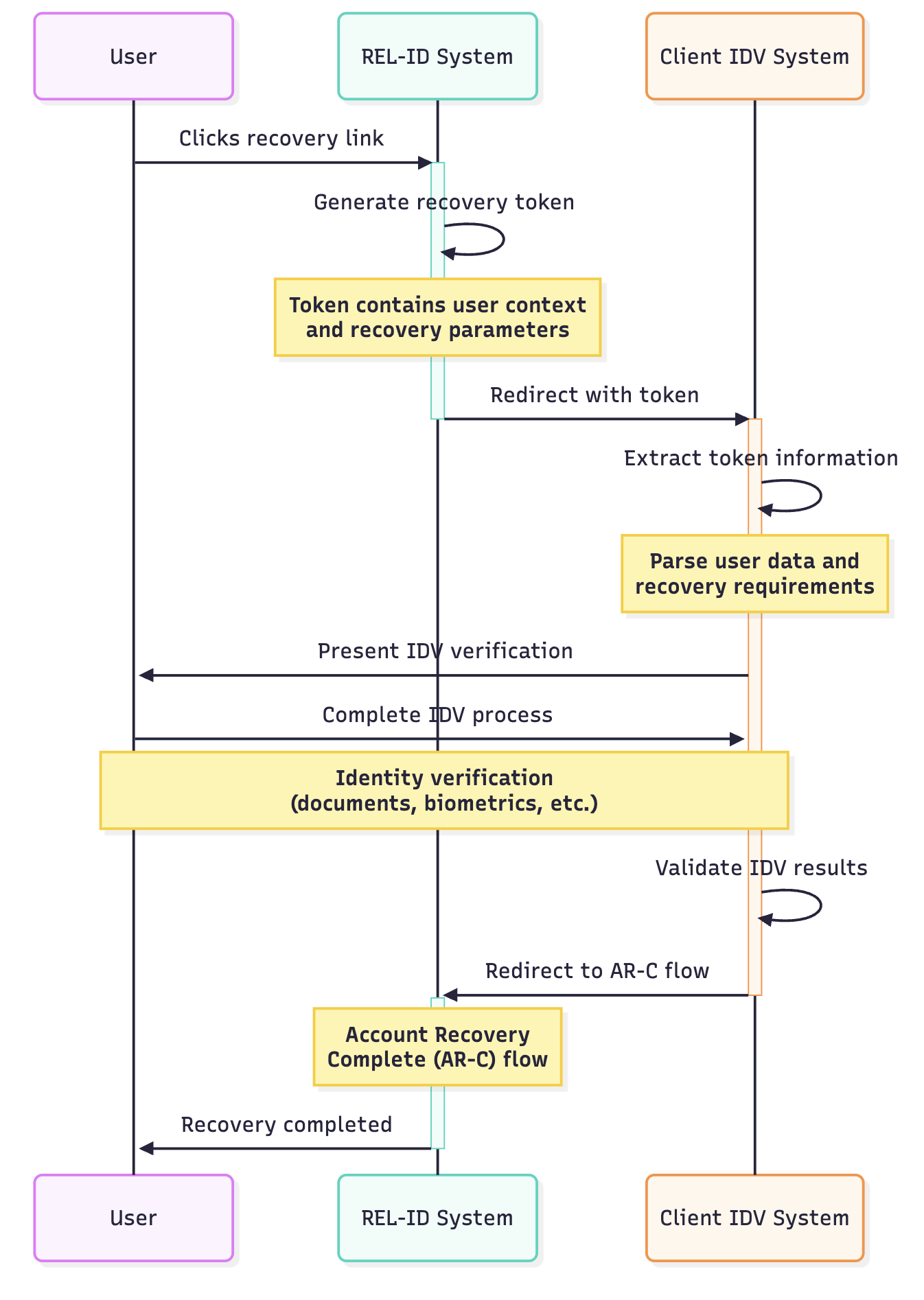
Process flow after Web Authentication portal redirects to client's IDV system for identity verification.
🔄 IDV Process Steps
1. 📨 Receive Redirect
• Incoming: Web Authentication portal redirects to client's IDV system
• Token Delivery: Authorization token included in redirect
• Context Preservation: All recovery context maintained
2. 🔍 Extract Recovery Information
• API Call: Use Verify Auth Server Token API to extract information
• Token Analysis: Determine authentication factor user requested recovery for
• User Identification: Extract user information from token
• Recovery Context: Understand specific recovery requirements
3. 🆔 Execute IDV Flow
• Custom Process: Client's IDV system starts its identity verification flow
• Verification Methods: Use client's preferred IDV methods
• User Interaction: User completes identity verification requirements
• Security Validation: Verify user identity according to client standards
4. ✅ Complete IDV Process
• Verification Success: User identity successfully verified
• Flow Completion: Client's IDV process completed
• Preparation: Ready to redirect user back to Ditto ID system
5. ➡️ Redirect to Credential Activation
• Next Step: Redirect user to Web Authentication portal
• Target: Browser-based Account Recovery Credential Activation (AR-C) flow
• Continuation: User continues to credential reset process
• Seamless Transition: Smooth handoff between systems
🌐 API Reference
• Token Verification: Ditto ID GM API Service Integration Guide - v1
• Section: Verify Auth Server's token
• URI: https://<GM-API-SERVER>:9442/v1/authServerTokens/{tokenId}
• Method: GET request to verify and extract token information
🔗 Integration Flow
Updated 10 months ago